Overview
Within SmartPOS Workstations, there are a number of Stock Control Till Functions & Product Till Functions that are available to Operators with the proper authorization.
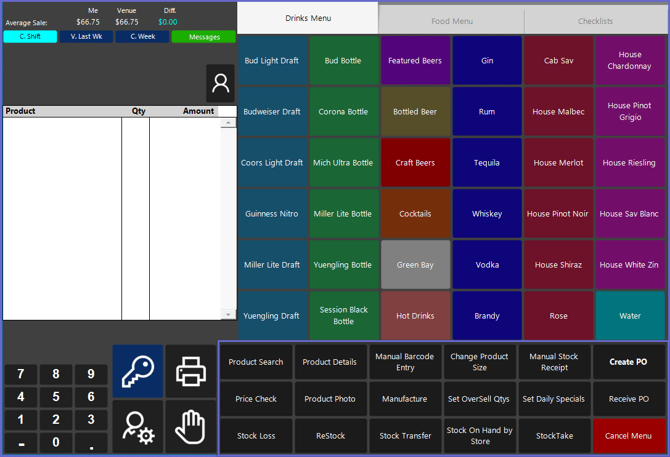
These include Till Functions that are specific to Products such as Searching for a Product, viewing Product Details, Changing Product Size, etc.
There are also Till Functions that are specific to Stock Control such as Stock Loss, Restock, Stocktake, etc.
Prerequisites
- To access Product Till Functions and Stock Control Till Functions, the applicable Operator Privileges will need to be enabled
- Operator Maintenance 'Till Privileges' Tab
- General: "Operate Tills" Flag
- General: "Stock Functions at Till" Flag
- Additional privilege flags may need to be enabled if particular Till Functions are configured to require a "Till Button Privilege" which are numbered 1-7
Accessing Stock Functions & Product Functions
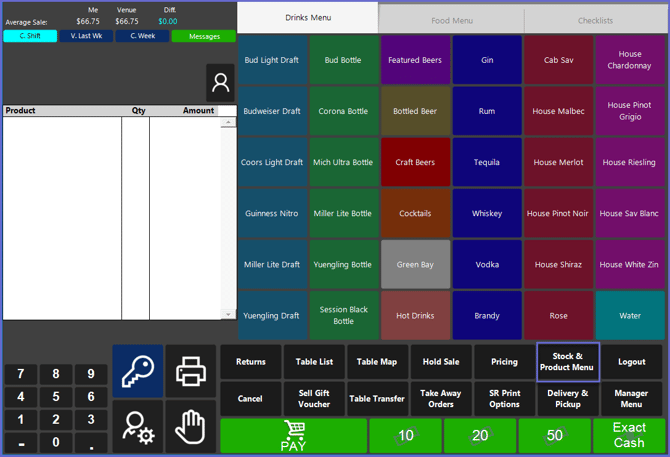
- By default, the Stock & Product Till Function Panel will be accessible via the main Function Panel of SmartPOS Workstations
- Function Panels can be customized and configured to the Organization's specifications in BackOffice, so this button may appear elsewhere or may be labeled differently
- After tapping on the Stock & Product Menu button, the Function Panel will open displaying the available Product and Stock Functions