
Overview
The Supplier List is used to maintain a list of Suppliers that Products can be purchased from, as well as linking Products to Suppliers.
After opening a Supplier Maintenance window, whether to Edit an existing Supplier or to Add a New Supplier, there will be a plethora of fields and configuration options which are detailed in this article.
When generating automatic Purchase Orders from the system, it is important to properly assign products to the correct supplier.
Otherwise, the automatic ordering feature will order Products not supplied by the Supplier, or miss Products that are supplied by the Supplier.
Prerequisites
- To access and Supplier Maintenance, the applicable Operator Privileges will need to be enabled:
- Operator Maintenance 'Maintenance' Tab
- Supplier: "View Suppliers" Flag
- Supplier: "Create New Suppliers" Flag
- Supplier: "Edit Suppliers" Flag
New Supplier vs. Editing an Existing Supplier
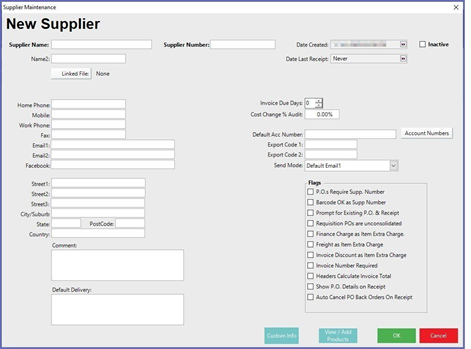
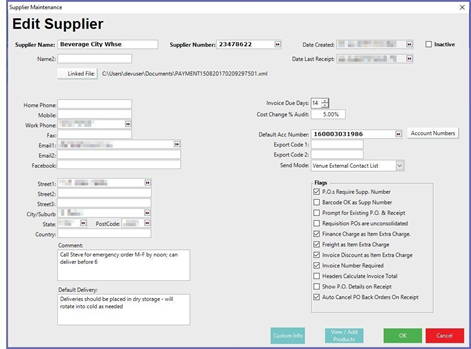
Configurations Options Explained
|
Configuration Option |
Description & Information |
| Supplier Name |
|
| Supplier Number |
|
| Date Created |
|
| Date Last Receipt |
|
| Inactive |
|
| Linked File |
|
| Contact Info & Address Details |
|
| Comment |
|
| Default Delivery |
|
| Invoice Due Days |
|
| Cost Change % Audit |
|
| Default Acc Number |
|
| Export Codes |
|
| Send Mode |
|
| P.O.s Require Supp. Number |
|
| Barcode OK as Supp Number |
|
| Prompt for Existing P.O. & Receipt |
|
| Requisition POs are Unconsolidated |
|
| Finance Charge as Item Extra Charge |
|
| Freight as Item Extra Charge |
|
| Invoice Discount as Item Extra Charge |
|
| Invoice Number Required |
|
| Headers Calculate Invoice Total |
|
| Show P.O. Details on Receipt |
|
| Auto Cancel PO BackOrders On Receipt |
|